Auditors visit your teams every 12 months and ask to review all the Google Cloud Identity and Access Management (Cloud IAM) policy changes in the previous 12 months. You want to streamline and expedite the analysis and audit process.
What should you do?
Answer
Create custom Google Stackdriver alerts and send them to the auditor
Enable Logging export to Google BigQuery and use ACLs and views to scope the data shared with the auditor
Use cloud functions to transfer log entries to Google Cloud SQL and use ACLs and views to limit an auditor's view
Enable Google Cloud Storage (GCS) log export to audit logs into a GCS bucket and delegate access to the bucket
Card 82
Question
You have created several pre-emptible Linux virtual machine instances using Google Compute Engine. You want to properly shut down your application before the virtual machines are preempted.
What should you do?
Answer
Create a shutdown script named k99.shutdown in the /etc/rc.6.d/ directory
Create a shutdown script registered as a xinetd service in Linux and configure a Stackdriver endpoint check to call the service
Create a shutdown script and use it as the value for a new metadata entry with the key shutdown-script in the Cloud Platform Console when you create the new virtual machine instance
Create a shutdown script, registered as a xinetd service in Linux, and use the gcloud compute instances add-metadata command to specify the service URL as the value for a new metadata entry with the key shutdown-script-url
Card 83
Question
Your company wants to try out the cloud with low risk. They want to archive approximately 100 TB of their log data to the cloud and test the analytics features available to them there, while also retaining that data as a long-term disaster recovery backup.
Which two steps should you take? Choose 2 answers.
Answer
Load logs into Google BigQuery
Load logs into Google Cloud SQL
Import logs into Google Stackdriver
Insert logs into Google Cloud Bigtable
Upload log files into Google Cloud Storage
Card 84
Question
You created a pipeline that can deploy your source code changes to your infrastructure in instance groups for self-healing. One of the changes negatively affects your key performance indicator. You are not sure how to fix it, and investigation could take up to a week.
What should you do?
Answer
Log in to a server, and iterate on the fox locally
Revert the source code change, and rerun the deployment pipeline
Log into the servers with the bad code change, and swap in the previous code
Change the instance group template to the previous one, and delete all instances
Card 85
Question
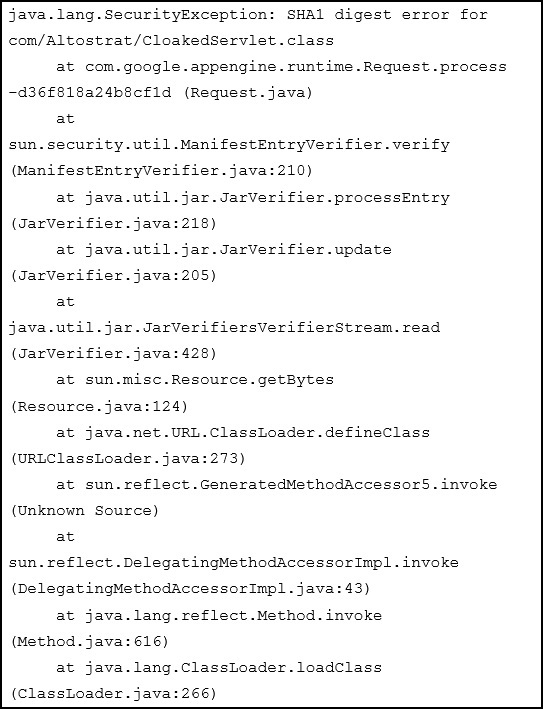
You deploy your custom Java application to Google App Engine. It fails to deploy and gives you the following stack trace. What should you do?
Answer
Upload missing JAR files and redeploy your application.
Digitally sign all of your JAR files and redeploy your application
Recompile the CLoakedServlet class using and MD5 hash instead of SHA1
Card 86
Question
As part of implementing their disaster recovery plan, your company is trying to replicate their production MySQL database from their private data center to their
GCP project using a Google Cloud VPN connection. They are experiencing latency issues and a small amount of packet loss that is disrupting the replication.
What should they do?
Answer
Configure their replication to use UDP.
Configure a Google Cloud Dedicated Interconnect.
Add additional VPN connections and load balance them.
Restore their database daily using Google Cloud SQL.
Send the replicated transaction to Google Cloud Pub/Sub.
Card 87
Question
Your customer support tool logs all email and chat conversations to Cloud Bigtable for retention and analysis. What is the recommended approach for sanitizing this data of personally identifiable information or payment card information before initial storage?
Answer
Hash all data using SHA256
Encrypt all data using elliptic curve cryptography
De-identify the data with the Cloud Data Loss Prevention API
Use regular expressions to find and redact phone numbers, email addresses, and credit card numbers
Card 88
Question
You are using Cloud Shell and need to install a custom utility for use in a few weeks. Where can you store the file so it is in the default execution path and persists across sessions?
Answer
Cloud Storage
~/bin
/google/scripts
/usr/local/bin
Card 89
Question
You want to create a private connection between your instances on Compute Engine and your on-premises data center. You require a connection of at least 20
Gbps. You want to follow Google-recommended practices. How should you set up the connection?
Answer
Create a VPC and connect it to your on-premises data center using Dedicated Interconnect.
Create a Cloud Content Delivery Network (Cloud CDN) and connect it to your on-premises data center using Dedicated Interconnect.
Create a VPC and connect it to your on-premises data center using a single Cloud VPN.
Create a Cloud Content Delivery Network (Cloud CDN) and connect it to your on-premises datacenter using a single Cloud VPN.
Card 90
Question
You are building a continuous deployment pipeline for a project stored in a Git source repository and want to ensure that code changes can be verified deploying to production. What should you do?
Answer
Use Spinnaker to deploy builds to production using the red/black deployment strategy so that changes can easily be rolled back.
Use Spinnaker to deploy builds to production and run tests on production deployments.
Use Jenkins to build the staging branches and the master branch. Build and deploy changes to production for 10% of users before doing a complete rollout.
Use Jenkins to monitor tags in the repository. Deploy staging tags to a staging environment for testing. After testing, tag the repository for production and deploy that to the production environment.
Card 91
Question
Your company has multiple on-premises systems that serve as sources for reporting. The data has not been maintained well and has become degraded over time. You want to use Google-recommended practices to detect anomalies in your company data. What should you do?
Answer
Upload your files into Cloud Storage. Use Cloud Datalab to explore and clean your data.
Upload your files into Cloud Storage. Use Cloud Dataprep to explore and clean your data.
Connect Cloud Datalab to your on-premises systems. Use Cloud Datalab to explore and clean your data.
Connect Cloud Datalab to your on-premises systems. Use Cloud Datalab to explore and clean your data.
Card 92
Question
You are migrating your on-premises solution to Google Cloud in several phases. You will use Cloud VPN to maintain a connection between your on-premises systems and Google Cloud until the migration is completed. You want to make sure all your on-premise systems remain reachable during this period. How should you organize your networking in Google Cloud?
Answer
Use the same IP range on Google Cloud as you use on-premises
Use the same IP range on Google Cloud as you use on-premises for your primary IP range and use a secondary range that does not overlap with the range you use on-premises
Use an IP range on Google Cloud that does not overlap with the range you use on-premises
Use an IP range on Google Cloud that does not overlap with the range you use on-premises for your primary IP range and use a secondary range with the same IP range as you use on-premises
Card 93
Question
You have found an error in your App Engine application caused by missing Cloud Datastore indexes. You have created a YAML file with the required indexes and want to deploy these new indexes to Cloud Datastore. What should you do?
Answer
Point gcloud datastore create-indexes to your configuration file
In the GCP Console, use Datastore Admin to delete the current indexes and upload the new configuration file
Upload the configuration file the App Engine's default Cloud Storage bucket, and have App Engine detect the new indexes
Create an HTTP request to the built-in python module to send the index configuration file to your application
Card 94
Question
You are working in a highly secured environment where public Internet access from the Compute Engine VMs is not allowed. You do not yet have a VPN connection to access an on-premises file server. You need to install specific software on a Compute Engine instance. How should you install the software?
Answer
Upload the required installation files to Cloud Storage. Configure the VM on a subnet with a Private Google Access subnet. Assign only an internal IP address to the VM. Download the installation files to the VM using gsutil.
Upload the required installation files to Cloud Storage and use firewall rules to block all traffic except the IP address range for Cloud Storage. Download the files to the VM using gsutil.
Upload the required installation files to Cloud Source Repositories and use firewall rules to block all traffic except the IP address range for Cloud Source Repositories. Download the files to the VM using gsutil.
Upload the required installation files to Cloud Source Repositories. Configure the VM on a subnet with a Private Google Access subnet. Assign only an internal IP address to the VM. Download the installation files to the VM using gcloud.
Card 95
Question
Your company is moving 75 TB of data into Google Cloud. You want to use Cloud Storage and follow Google-recommended practices. What should you do?
Answer
Move your data onto a Transfer Appliance. Use a Transfer Appliance Rehydrator to decrypt the data into Cloud Storage.
Install gsutil on each server that contains data. Use resumable transfers to upload the data into Cloud Storage.
Move your data onto a Transfer Appliance. Use Cloud Dataprep to decrypt the data into Cloud Storage.
Install gsutil on each server containing data. Use streaming transfers to upload the data into Cloud Storage.
Card 96
Question
You have an application deployed on Kubernetes Engine using a Deployment named echo-deployment. The deployment is exposed using a Service called echo- service. You need to perform an update to the application with minimal downtime to the application. What should you do?
Answer
Use kubectl set image deployment/echo-deployment <new-image>
Use the rolling update functionality of the Instance Group behind the Kubernetes cluster
Update the deployment yaml file with the new container image. Use kubectl delete deployment/echo-deployment and kubectl create -f
Update the service yaml file which the new container image. Use kubectl delete service/echo-service and kubectl create -f
Card 97
Question
Your company is using BigQuery as its enterprise data warehouse. Data is distributed over several Google Cloud projects. All queries on BigQuery need to be billed on a single project. You want to make sure that no query costs are incurred on the projects that contain the data. Users should be able to query the datasets, but not edit them.
How should you configure users' access roles?
Answer
Add all users to a group. Grant the group the role of BigQuery user on the billing project and BigQuery dataViewer on the projects that contain the data
Add all users to a group. Grant the group the roles of BigQuery jobUser on the billing project and BigQuery dataViewer on the projects that contain the data
Add all users to a group. Grant the group the roles of BigQuery dataViewer on the billing project and BigQuery user on the projects that contain the data
Add all users to a group. Grant the group the roles of BigQuery dataViewer on the billing project and BigQuery jobUser on the projects that contain the data
Card 98
Question
You have developed an application using Cloud ML Engine that recognizes famous paintings from uploaded images. You want to test the application and allow specific people to upload images for the next 24 hours. Not all users have a Google Account. How should you have users upload images?
Answer
Have users upload the images to Cloud Storage. Protect the bucket with a password that expires after 24 hours.
Have users upload the images to Cloud Storage using a signed URL that expires after 24 hours.
Create an App Engine web application where users can upload images. Configure App Engine to disable the application after 24 hours. Authenticate users via Cloud Identity.
Create an App Engine web application where users can upload images for the next 24 hours. Authenticate users via Cloud Identity.
Card 99
Question
Your web application must comply with the requirements of the European Union's General Data Protection Regulation (GDPR). You are responsible for the technical architecture of your web application. What should you do?
Answer
Ensure that your web application only uses native features and services of Google Cloud Platform, because Google already has various certifications and provides "pass-on" compliance when you use native features.
Enable the relevant GDPR compliance setting within the GCPConsole for each of the services in use within your application.
Ensure that Cloud Security Scanner is part of your test planning strategy in order to pick up any compliance gaps.
Define a design for the security of data in your web application that meets GDPR requirements.
Card 100
Question
The development team has provided you with a Kubernetes Deployment file. You have no infrastructure yet and need to deploy the application. What should you do?
Answer
Use gcloud to create a Kubernetes cluster. Use Deployment Manager to create the deployment.
Use kubectl to create a Kubernetes cluster. Use Deployment Manager to create the deployment.
Use gcloud to create a Kubernetes cluster. Use kubectl to create the deployment.
Use kubectl to create a Kubernetes cluster. Use kubectl to create the deployment.
How to use this set
Read the preview and check whether the content and answers suit your learning goal. You can add the public set to your sets to study it. Your account shows the available actions.